Picture this: You’re staring at your manuscript, knowing something’s off but can’t quite put your finger on it. Should you fix those grammar gremlins first, or let your creative ideas flow freely? If you’re torn between ProWritingAid vs Sudowrite, you’re not alone. We’ve tested both tools extensively to help you pick the one that truly matches your writing style and goals.
Before we dive deep, here’s what you need to know right now:
ProWritingAid is a comprehensive style editor with 25+ reports.
ProWritingAid is a comprehensive grammar checker and style editor launched in 2012 by UK-based Orpheus Technology. It analyzes your writing through 25+ detailed reports covering grammar, style, readability, and manuscript structure. The platform integrates seamlessly with Microsoft Word, Google Docs, and Scrivener, and works across the web via browser extensions, making it ideal for writers who need thorough editing across multiple platforms and document types.
Sudowrite is a creative AI for fiction authors, using GPT-4.
Sudowrite is an AI-powered creative writing assistant specifically designed for fiction authors and storytellers. Using advanced models like GPT-4 and Claude 2, it helps writers brainstorm ideas, generate content, expand scenes, and develop characters. The tool focuses on overcoming writer’s block and enhancing creativity rather than correcting errors. Sudowrite operates through a credit-based system where complex features (like Rewrite or Expand) consume more credits.
When comparing ProWritingAid vs Sudowrite, we need to look beyond surface features. These tools serve fundamentally different purposes in the writing process. Let’s examine five critical areas where one clearly outshines the other.
Fast Comparison Table
| Feature | ProWritingAid | Sudowrite | Winner |
| Grammar & Spelling | Comprehensive error detection | Minimal (Red underlines only) | ProWritingAid |
| Style & Readability | 25+ analytical reports | Limited analysis | ProWritingAid |
| Creative Generation | Limited (Sparks only) | Extensive brainstorming tools | Sudowrite |
| Rewriting & Expansion | AI-powered Rephrase | Advanced Rewrite & Expand | Sudowrite |
| Plagiarism Detection | Built-in checker (Premium) | Not available | ProWritingAid |
ProWritingAid delivers robust grammar and spelling correction that surpasses even Microsoft Word’s built-in checker. The tool catches subtle errors like misplaced modifiers, inconsistent tenses, and complex punctuation mistakes. It provides detailed explanations for each error, helping writers understand why something needs correction.
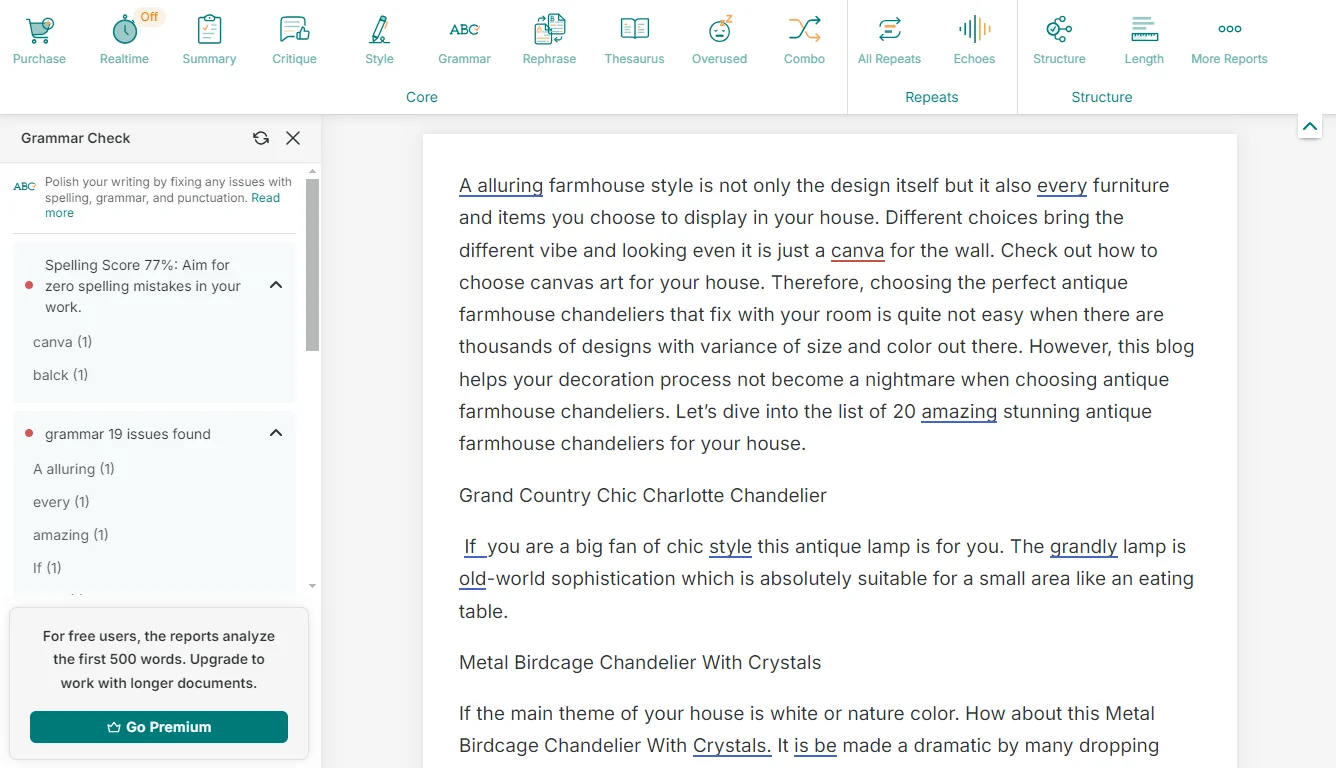
PWA offers robust grammar correction with detailed explanations.
In contrast, Sudowrite only highlights misspelled words with red underlines without offering correction suggestions. This isn’t a flaw—it’s simply not Sudowrite’s purpose. For writers needing thorough proofreading, ProWritingAid wins decisively. However, if you’re drafting fiction and don’t want interruptions, Sudowrite’s minimal grammar interference actually becomes an advantage.
Winner: ProWritingAid
ProWritingAid shines with its 25+ analytical reports that dissect every aspect of your writing style. You’ll get insights on readability scores, sentence length variation, overused words, clichés, transitions, pacing, and dialogue tags. The platform identifies weak phrases, passive voice, and redundancies while suggesting stronger alternatives. These reports can analyze manuscripts up to 300,000 words, perfect for full-length novels.
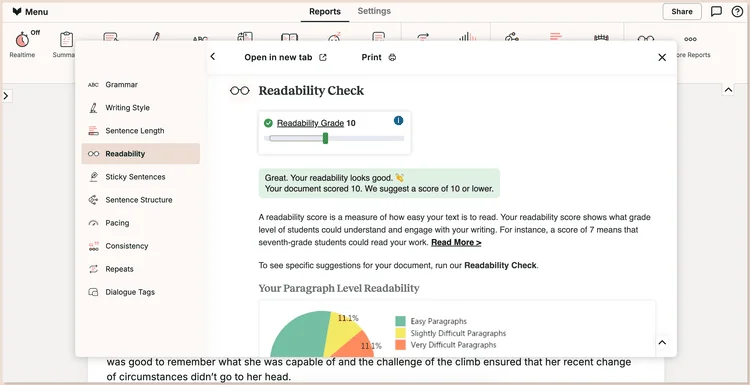
PWA’s 25+ reports analyze style, pacing, and long manuscripts.
Sudowrite doesn’t offer comparable style analysis tools. While it provides feedback through its beta reader feature, this focuses more on plot and character development than linguistic style. For writers serious about polishing their prose and understanding their stylistic patterns, ProWritingAid provides unmatched depth.
Winner: ProWritingAid
Sudowrite dominates creative generation with purpose-built tools for fiction writers. Its Brainstorm feature generates plot twists, character motivations, dialogue ideas, and world-building details on demand. The Write tool continues your narrative when you’re stuck, matching your voice and style remarkably well. The Story Bible organizes characters, locations, and lore, keeping continuity across long projects.
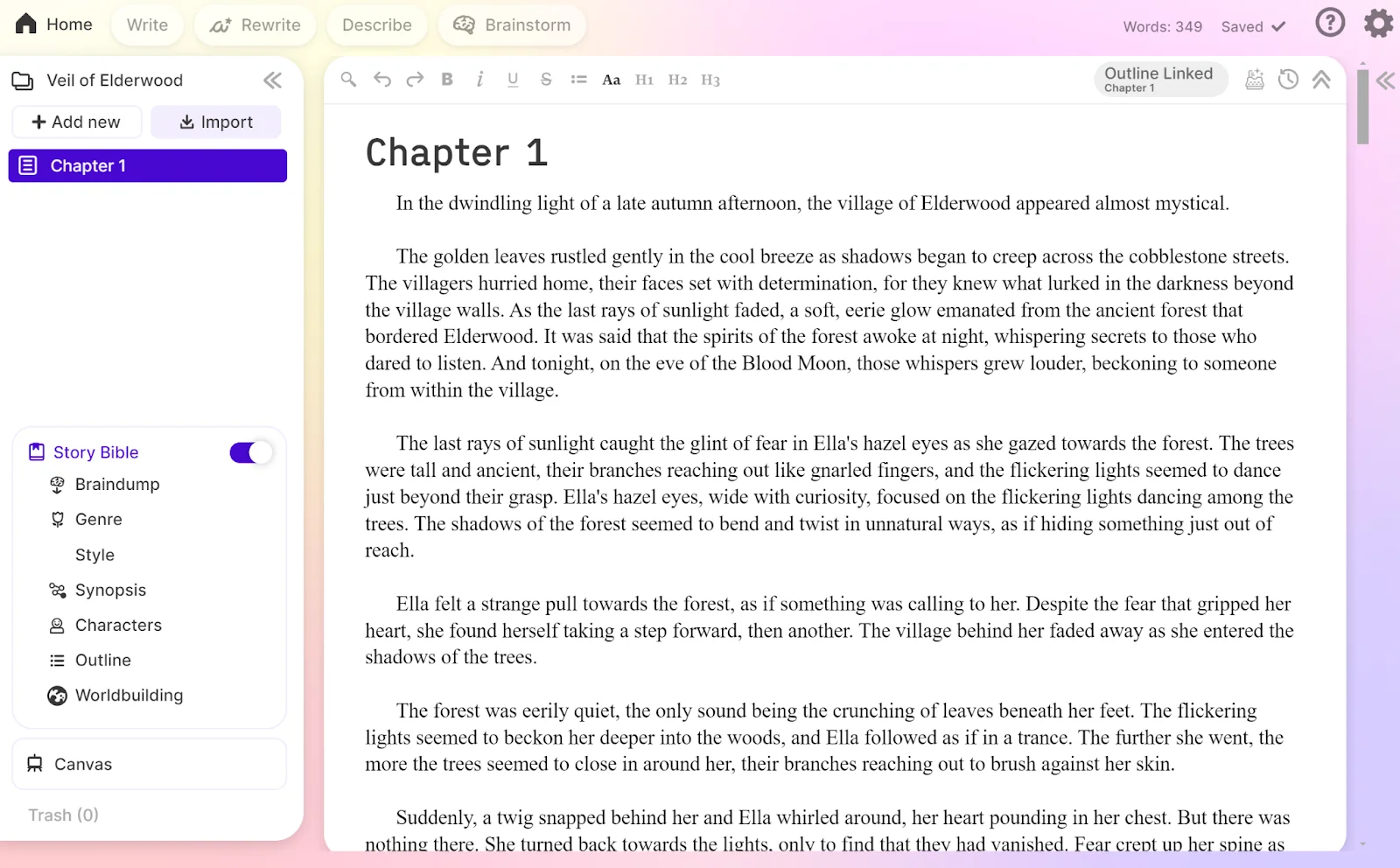
Sudowrite excels at creative brainstorming and narrative continuity.
ProWritingAid offers Sparks, but it is limited to just 3-5 prompts per day on standard plans and up to 50 on the Premium Pro plan. The difference is stark: Sudowrite was designed from the ground up for creative storytelling, while ProWritingAid added AI features as supplements to its editing focus.
Winner: Sudowrite
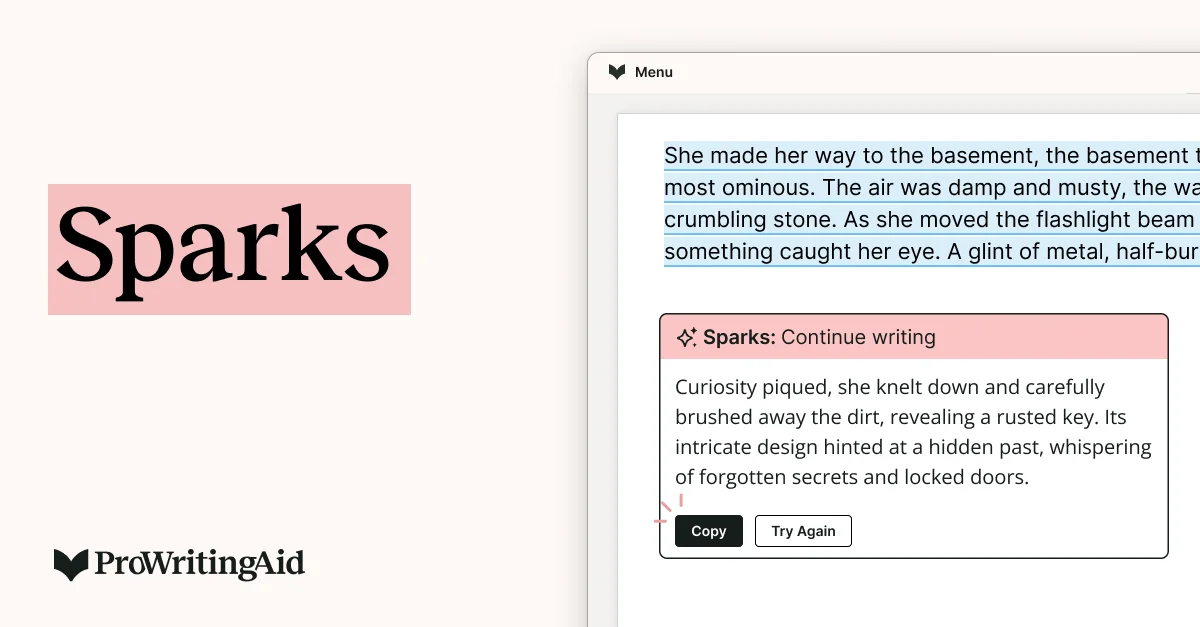
PWA’s Sparks feature is limited to 3-5 prompts daily on standard plans.
Sudowrite’s Rewrite and Expand tools transform how you revise fiction. The Rewrite feature offers multiple variations of any passage—shortening, lengthening, adding detail, or following custom instructions you provide. The Expand tool fleshes out sparse scenes, adding sensory details and emotional depth while maintaining your voice. Quick Edit allows flexible, instruction-based modifications without switching tools.
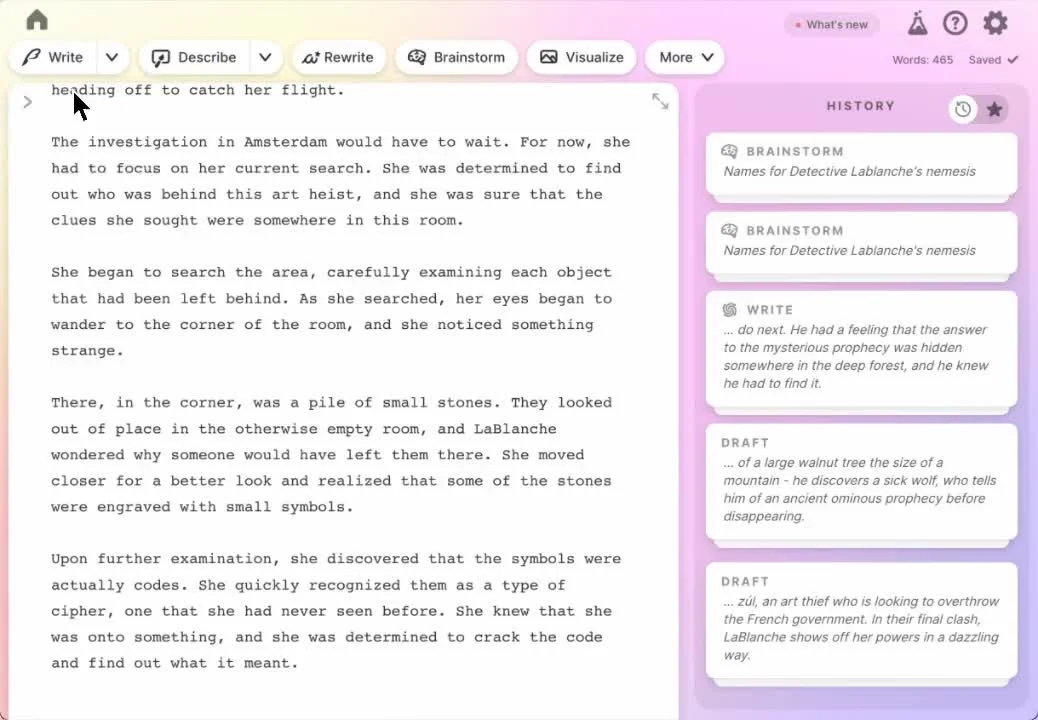
Sudowrite’s rewrite/expand tools revise fiction with custom variations.
ProWritingAid’s Rephrase feature provides AI-powered rewrites, but it’s more limited in scope and daily usage. For fiction writers who need to develop thin scenes or experiment with different narrative approaches, Sudowrite’s expansion capabilities feel almost magical. The credit-based system means heavy users might run out, but the quality justifies the consumption.
Winner: Sudowrite

PWA’s Rephrase is limited, less magical than Sudowrite’s expansion.
ProWritingAid includes plagiarism checks, available as add-ons or in specific bundles, scanning your text against billions of web pages and published works. This feature is essential for academic writers, students, and authors who need to verify originality before publication. The checker highlights potentially problematic passages and shows similarity percentages.

PWA includes plagiarism checks for verifying text originality.
Sudowrite doesn’t offer plagiarism detection at all. However, the tool addresses plagiarism concerns differently: its word-by-word generation process makes verbatim copying extremely unlikely. Unless you deliberately input copyrighted text, Sudowrite won’t reproduce it. For verifying originality, ProWritingAid wins. For generating original content safely, Sudowrite’s architecture prevents the issue entirely.
Winner: ProWritingAid
You may be interested in:
ProWritingAid vs ChatGPT: Which is the best for Writers in 2025?
Grammarly vs ProWritingAid: Which is better for proofreading in 2025?
| ProWritingAid | Sudowrite | |
|---|---|---|
| Pros | ✅ Comprehensive grammar and spelling checking
✅ 25+ detailed analytical reports for style improvement ✅ Analyzes full manuscripts up to 300,000 words ✅ Integrates with 500,000+ apps and platforms ✅ Plagiarism checker included (Premium plans) ✅ Free plan available with a 500-word limit ✅ Desktop app offers some offline functionality ✅ Lower starting price ($10/month) |
✅ Exceptional creative story generation tools
✅ Best-in-class AI for matching your writing voice ✅ Intuitive, modern interface that’s easy to learn ✅ Powerful brainstorming and plot development features ✅ Story Bible for organizing characters and world details ✅ Multiple AI models (GPT-4, Claude 2, 20+ others) ✅ Credit rollover on Max plan (12 months) ✅ Easy cancellation with “EZ Cancel Guarantee” |
| Cons | ❌ Interface feels dated compared to modern alternatives
❌ Limited creative content generation (Sparks only) ❌ Can overwhelm beginners with too many reports ❌ Daily limits on AI features (5 Sparks on Premium) ❌ No built-in story development tools |
❌ No free plan, only a limited free trial
❌ The credit system can be restrictive for heavy users ❌ Web-only access, no offline mode available ❌ Minimal grammar and spelling correction ❌ No plagiarism detection feature ❌ Requires copy-paste workflow (limited integration) ❌ Higher cost at upper tiers ($44/month for Max plan) |
| Aspect | ProWritingAid | Sudowrite |
| Free Plan | Yes—500 words per check, 3 Sparks/day | No – Only 10,000 credit free trial |
| Free Trial | Available without a credit card | Available without a credit card |
| Billing Cycles | Monthly, yearly, or lifetime | Monthly or yearly (yearly = up to 50% off) |
| Refund Policy | 14-day money-back guarantee | Not explicitly stated |
| Credit Card | Not required for the free plan | Not required for free trial |
| Usage System | Unlimited word count (Premium+) | Credit-based (varies by feature) |
| Downgrade/Upgrade | Flexible plan changes | Easy upgrade/downgrade/pause anytime |
| Rollover | N/A | Yes—Max plan only (12 months) |
| Notable Feature | Plagiarism checker (Premium plans) | Enterprise custom pricing available |
Key Insights:
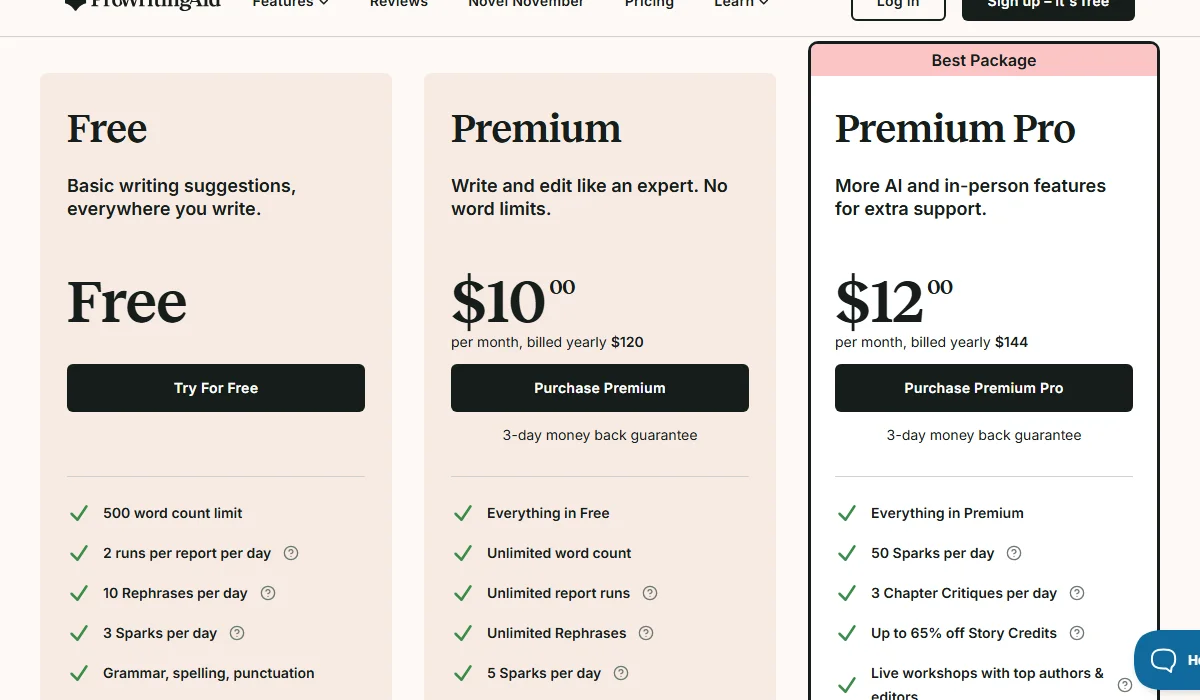
ProWritingAid Pricing Plan
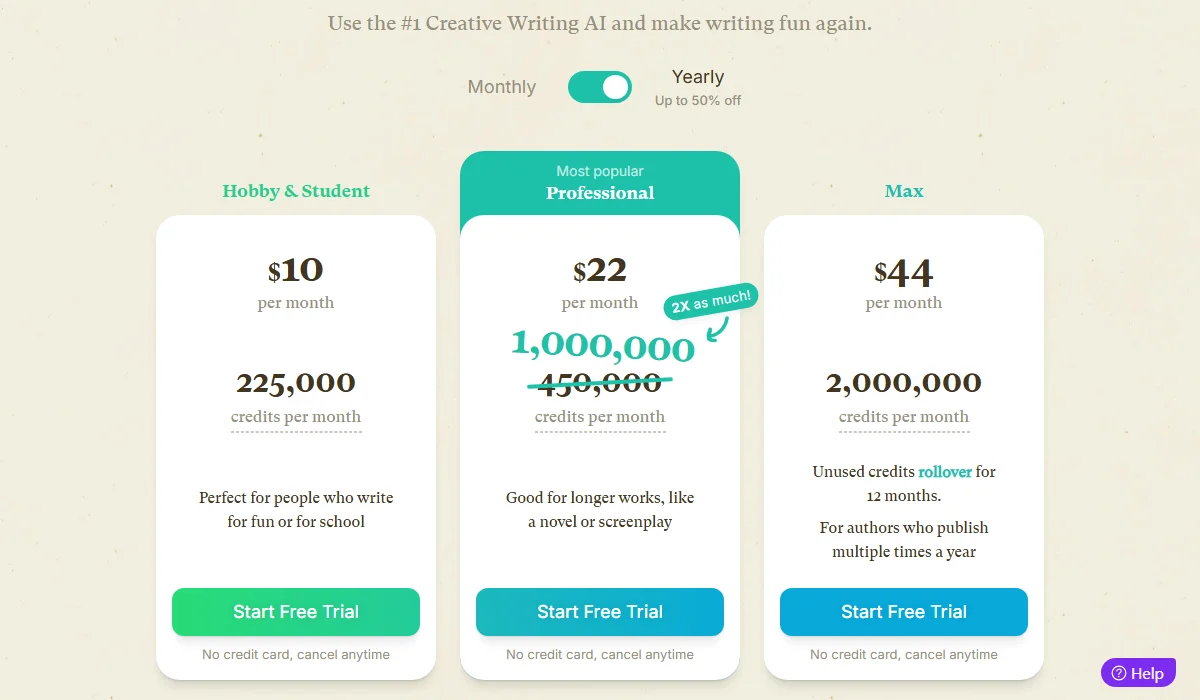
Sudowrite Pricing Plan
To ensure you choose the tool that best fits your specific needs, consider these four critical factors before making a decision:
You may be interested in:
ProWritingAid vs Wordtune (2025): Which is the best AI Writing Assistant?
ProWritingAid vs QuillBot: Which Is the Better Grammar Checker in 2025?
Choose ProWritingAid if you’re:
Choose Sudowrite if you’re:
Use Both Tools Together if you’re:
Ready to elevate your writing? Start your free trial with either tool today and experience the difference AI assistance can make. Share your experiences in the comments below—we’d love to hear which tool works best for your writing style!
You may be interested in:
Sudowrite vs Jasper: Which AI Writing Assistant Wins in 2025?
Sudowrite vs Novelcrafter: Which AI Writing Assistant Wins in 2025?